Table of Contents
- The Limits of Prompt-Based AI
- What Are Traditional Chatbots?
- What Is Clawdbot (OpenClaw)?
- Core Differences: AI Agents vs Traditional Chatbots
- Persistent Memory: The Engine of Autonomous Context
- How Autonomous AI Agents Execute Tasks
- Real-World Developer Use Cases
- Code Comparison: Prompts vs. Execution Loops
- From “Assistant” to “Digital Coworker”
- FAQ
- Conclusion
The Limits of Prompt-Based AI
You’ve likely used a chatbot to write a function, debug a React component, or draft an API spec. It works. You simulate a conversation, copy the output, paste it into your IDE, and run it.
But focus on what you just did: you acted as the manual automation layer. You copied. You pasted. You executed. You verified.
Traditional chatbots are reactive tools. They wait for a prompt, generate text, and stop. Every action required to actually use that text — opening a file, running a test, checking a calendar, sending a Slack message — remains your responsibility.
Autonomous AI agents like Clawdbot represent a fundamental shift. They don’t just generate text. They execute workflows.
What Are Traditional Chatbots?
A traditional chatbot — including standard interfaces for ChatGPT, Claude, and Gemini — operates on a simple, linear model:
- Input: You send a message.
- Processing: The LLM generates a text response.
- Termination: The session waits for your next input.
This model excels at information retrieval and content generation. However, for developers looking for AI workflow automation, it has critical limitations:
- Zero Persistent Memory: Every new chat starts blank. You must re-explain your project context every time.
- No Real-World Agency: It can tell you how to deploy code, but it cannot click the button for you.
- No Proactivity: It never initiates a task. It only responds.
- Single-Turn Execution: It cannot plan, execute, and adapt to a multi-step workflow autonomously.
For software engineers, a traditional chatbot is a brilliant encyclopedia — but it’s not a coworker.
What Is Clawdbot (OpenClaw)?
Clawdbot (maintained as OpenClaw) is an open-source, self-hosted autonomous AI agent. Unlike a chatbot, it connects to your tools (terminal, browser, email, calendar) and executes multi-step tasks autonomously via messaging apps like WhatsApp and Telegram.
Created by Peter Steinberger, Clawdbot quickly amassed over 29,900 GitHub stars because it solves the “action gap.” It’s often described as “Claude with hands.”
Instead of just describing a solution, Clawdbot acts:
- Browses the web to retrieve real-time documentation or pricing.
- Runs shell commands to deploy apps or check server health.
- Manages communication by drafting emails or scheduling meetings.
- Maintains context across days, weeks, and different platforms.
You interact with it naturally through the apps you already use, transforming chat (WhatsApp, Telegram, Slack) into a command line for your life.
Core Differences: AI Agents vs Traditional Chatbots
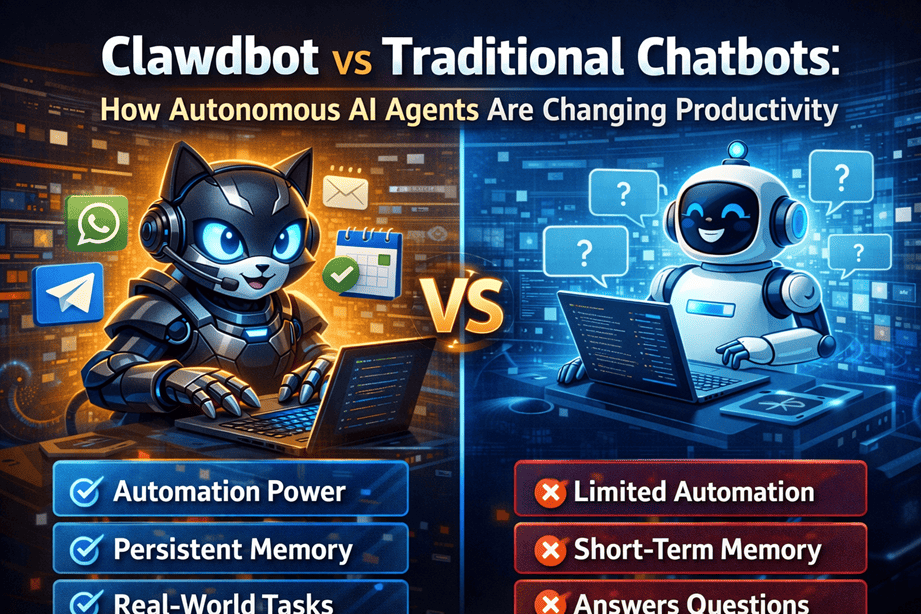
The distinction between AI agents and chatbots is effectively the difference between advice and action.
| Feature | Traditional Chatbot | Clawdbot (Autonomous Agent) |
|---|---|---|
| Primary Output | Text Generation | Action Execution + Text |
| Memory | Session-Based (Ephemeral) | Persistent (Project & User Context) |
| Proactivity | Reactive (Waits for you) | Proactive (Initiates tasks) |
| Agency | Describes steps | Executes steps |
| Integrations | Limited Plugins | Full API, Shell, & Browser Access |
| Privacy | Cloud-Hosted | Self-Hosted / Local-First |
| Workflow | Single-Turn | Multi-Step Autonomous loops |
This shift from “text generator” to “task executor” is why AI productivity tools for developers are evolving rapidly in 2026.
Persistent Memory: The Engine of Autonomous Context
One of the most significant advantages of autonomous AI agents is persistent memory.
When you open a new ChatGPT session, it knows nothing about your previous work. Your tech stack, your naming conventions, your deployment preferences — all gone. You spend the first 5 minutes just setting the stage.
Clawdbot remembers. Because it runs on your local machine with a persistent database, it retains:
- Project Context: “This is the PlayboxJS repo using Astro and React.”
- User Preferences: “You prefer concise git commit messages.”
- Past Decisions: “We decided to use Tailwind for all new components.”
- Active Workflows: “I’m still monitoring that deployment from this morning.”
In practice, this means you can say: “Deploy the fix we discussed yesterday,” and the agent knows exactly what “the fix” is and where “deploy” happens. This drastically reduces the cognitive load of developer AI tools.
How Autonomous AI Agents Execute Tasks
A traditional chatbot processes one input at a time. An autonomous AI agent operates in a continuous execution loop:
- Perceive: Receive a user goal (“Fix the bug in the login form”).
- Plan: Break the goal into sub-steps (Read file -> Reproduce error -> Write fix -> Run tests).
- Act: Select and execute the right tool (e.g.,
run_test_command). - Observe: Read the output of the tool.
- Refine: If the test fails, plan a new fix. If it passes, commit the code.
- Report: Notify the user only when the task is done or blocked.
This loop allows AI coding automation to handle complex, messy realities that simple prompt-response models cannot.
Real-World Developer Use Cases
1. Automated Code Generation & Review
Ask Clawdbot to generate a utility function, create a unit test file for it, run the tests, and fix any failures — all without you opening VS Code.
2. DevOps & Deployment Automation
User: “Deploy the staging branch.” Agent: Pulls the latest code, runs the build script, restarts the PM2 process, and pings you on Telegram with the status.
3. Intelligent Monitoring
Set up an agent to watch a GitHub repository. When a new release drops, the agent can parse the changelog, summarize breaking changes relevant to your project, and send you a Slack alert.
4. Documentation Maintenance
“Update the API docs for the User endpoints.” The agent reads the code, generates the JSDoc/OpenAPI specs, commits the changes, and opens a PR.
5. Debugging Workflows
Paste a stack trace into WhatsApp. The agent searches your local codebase for the error, identifies the file, and proposes a fix based on the surrounding code context.
Code Comparison: Prompts vs. Execution Loops
Traditional Chatbot (Prompt → Response)
// You are the automation layer.
// 1. You ask for code.
const response = await askChatbot("Write a debounce function");
// 2. You receive text.
console.log(response);
// 3. YOU copy, paste, save, and test it manually.
AI Agent (Plan → Execute → Report)
// The AGENT is the automation layer.
async function runAgentTask(goal) {
  // 1. Agent plans the workflow
  const plan = await agent.plan(goal);

  // 2. Agent executes tools autonomously
  await agent.executeTool("create_file", { path: "utils.js", content: plan.code });
  const testResult = await agent.executeTool("run_test", { file: "utils.test.js" });

  // 3. Agent self-corrects based on output
  if (testResult.failed) {
    await agent.executeTool("rewrite_code", { error: testResult.error });
  }

  // 4. Agent reports success
  return "Function created and tests passed.";
}
The difference is structural. The chatbot gives you ingredients. The agent cooks the meal.
From “Assistant” to “Digital Coworker”
The transition from AI assistant to AI coworker is defined by trust and delegation.
A chatbot is a tool you consult. You supervise every character of output. An AI productivity tool like Clawdbot is a system you delegate to. You assign a goal, and trust it to handle the implementation execution details.
Implications for Developers:
- Frontend: UI scaffolding, accessibility audits, and asset optimization become background tasks.
- Backend: API integration tests, database migrations, and log analysis become automated workflows.
- Focus Shift: Developers spend less time on syntax and boilerplate, and more time on system architecture and product logic.
This isn’t sci-fi. Tools like Clawdbot, AutoGPT, and BabyAGI are running in production environments today, automating the “boring” parts of software engineering.
FAQ
Are AI agents better than chatbots?
For task execution, yes. If you need to do something (send an email, deploy code, check a calendar), an AI agent is superior. If you just need to brainstorm ideas or draft text, a traditional chatbot is often sufficient (and simpler).
Can AI agents automate coding tasks?
Yes. AI agents can autonomously write code, create files, run terminal commands, and execute test suites. They are particularly effective for repetitive tasks like boilerplate generation, unit testing, and refactoring.
What is the difference between an AI assistant and an AI agent?
An AI assistant (like ChatGPT) typically responds to user prompts with text. An AI agent (like Clawdbot) can perceive its environment, make decisions, and execute actions (using tools) to achieve a goal without constant human intervention.
Is persistent AI memory safe?
With self-hosted agents like Clawdbot, your memory data lives on your own hardware, making it far more private than cloud-based LLM history. You control exactly what context is stored and for how long.
Do I need to know Python to use AI agents?
Not necessarily. While many agents are built in Python, Clawdbot and its skill ecosystem are JavaScript/Node.js native. If you know JS, you can build powerful skills and workflows immediately.
Conclusion
The gap between Clawdbot vs traditional chatbots is the gap between advice and action.
For developers, this evolution is critical. We spend hours every week providing the “glue” between our tools — copying IDs, running scripts, checking statuses. Autonomous AI agents offer a way to automate that glue, turning disjointed workflows into smooth, intelligent operations.
If you’re ready to experiment with this future, you don’t need a complex server setup to start. JavaScript is the language of modern AI agents.
Start by prototyping your agent’s logic and tools in a safe, browser-based environment. PlayboxJS lets you instantly write, run, and test the utility functions and API calls that will power your future agent — free, fast, and zero-setup.
Essential Tools for Building AI Agents:
- JSON Formatter — Debug JSON payloads from your agent’s tool calls.
- Regex Tester — Verify text parsing patterns for agent outputs.
- JavaScript Minifier — Optimize your agent’s skill scripts.
- Diff Checker — Compare agent-generated code versions instantly.